
Table of Contents
Let me paint you a picture.It’s 5:47 PM. You’re stuck on Third Mainland Bridge. The sun is doing its worst. The car in front of you hasn’t moved in 12 minutes. Your data is running low. And somewhere across Lagos, your competitor — who knows nothing more than you do — just finished building a website on their phone.
By the time you get home tonight, they’ll have a “Visit our website” link in their WhatsApp bio. By next week, they’ll have their first international client.That’s the reality right now.
And here’s the uncomfortable truth — over 70% of Nigerian businesses have no website. Not because they can’t. But because nobody showed them that in 2026, you don’t need a developer, you don’t need to write a single line of code, and you don’t need more than 45 minutes.That’s exactly what this guide is about.
These 7 Proven AI No-Code Tools to Build a Site in 45 Minutes are how Nigerians are cashing out in dollars — students, workers, entrepreneurs, complete beginners — all building professional websites fast and turning them into real income. By the time you finish reading, you’ll know exactly which tool to use, how to use it, and how to get paid. Let’s go.
First — Who Exactly Is This Guide For?
These 7 Proven AI No-Code Tools are not for developers. They’re for regular people with regular phones and regular internet connections who want real results. Specifically: Students: You don’t need a degree or a laptop worth ₦500k. You need a Wi-Fi connection and 45 minutes. These tools can help you build a portfolio, land remote internships, and start earning in dollars before you even finish school. We’ll come back to the exact steps for you.
9-to-5 Workers: Your salary is not going to save you. But a weekend hustle building websites for local businesses at ₦150,000–₦450,000 per project? That changes things. The best part — you already have all the tools you need. And if you’re wondering how 7 Proven Ways Workers Use AI for Career Growth to Get Promoted 10X Faster in 2026 ( Companies Pay AI Users 56% More) that’s a read you’ll want to bookmark too.
Freelancers and Side Hustlers: If you have been thinking about going freelance but do not know where to start, building websites with AI is one of the cleanest entry points in 2026.
Complete beginners are landing their first paying clients using AI tools with absolutely no experience required. The process is simple: choose an AI no-code tool like Lovable, v0, Bolt, Framer, Replit, Webflow, or any AI-powered website builder, write a 60-second description of the business, let the AI generate the site in minutes, make minor edits, add a call to action, and hit publish.
Your website goes live in 45 minutes or less. The barrier to entry has never been lower, but the window will not stay open forever—while you are thinking, someone else is taking action and landing the clients you could have had.
Start with one tool, build your own site as proof of concept, then reach out to local businesses that need websites. The only thing standing between you and your first paying client is 45 minutes
Small Business Owners: If a customer searches for your type of business in your city and can’t find you online — you’re losing that customer to someone who has a website. Every single day. These 7 Proven AI No-Code Tools to Build a Site in 45 Minutes exist specifically to fix that problem, fast.
The 7 Proven AI No-Code Tools to Build a Site in 45 Minutes
Here they are. All seven. Broken down clearly — what each tool does, when to use it, how to use it, and the honest pros and cons. No fluff.
Tool 1 — Framer AI: The One That Makes You Look Like a Design Agency
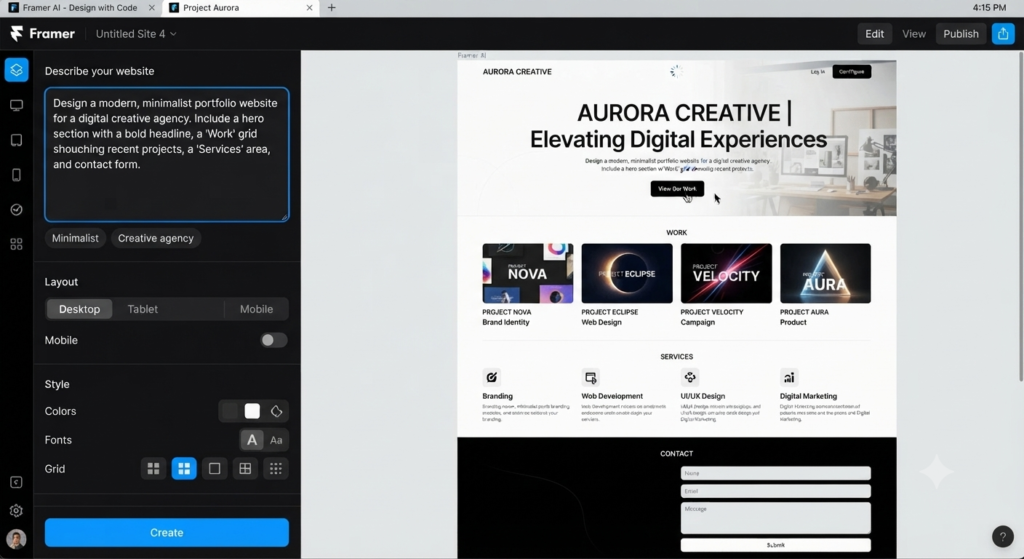
What is this? Framer AI is a website builder where you describe your website in plain English and it builds the whole thing in under 60 seconds. Type “a dark, minimal portfolio site for a Lagos-based brand designer” — and it generates a full site with pages, layouts, fonts, and colours. Done. When to use it: Use Framer AI when the design needs to look premium. For creative professionals — designers, photographers, consultants, coaches — Framer produces results that look like a ₦500,000 agency job.
Why it’s one of the 7 Proven AI No-Code Tools Nigerians are cashing out in dollars with: The output quality is exceptional. Foreign clients — UK, US, Canada — are used to seeing this level of design. When you show them a Framer site, they don’t question your price.
How to use it — Step by Step:
- Go to framer.com → click “Start for Free”
- Type a clear description: business type, industry, and the feel you Want
- Let the AI generate the full site (30–60 seconds)
- Swap out placeholder text and images with real client Details
- connect a domain and publish
Pros:
- Stunning, professional design quality straight away
- Fast generation — under 60 seconds from prompt to full website
- Free plan available for basic builds
Cons:
- Needs stable internet — not ideal for areas with constant Disconnected
- Some advanced features require a paid plan (from $5/month)
Tool 2 — Hostinger AI: The All-in-One That Works for Everyday Nigerians
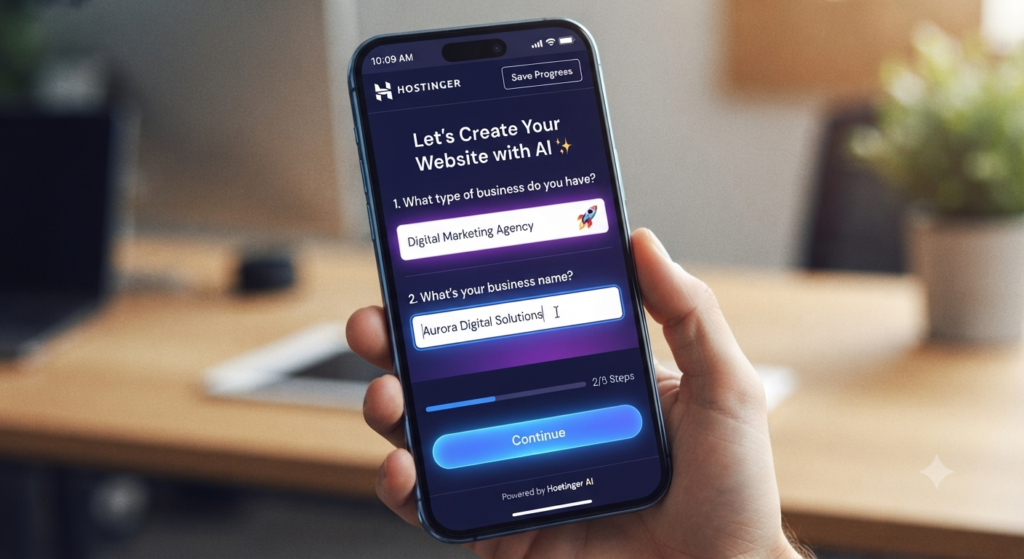
What it is: Hostinger is already well known in Nigeria for affordable web hosting. But their AI website builder goes further — you answer 5 quick questions about your business and it builds your entire website automatically. Pages, content, layout, all of it.
When to use it: For business owners who just want a clean, working website without overthinking it. Suya spot, pharmacy, school, salon, logistics company — Hostinger AI handles it all.
Why it’s one of the 7 Proven AI No-Code Tools to Build a Site in 45 Minutes: It bundles hosting + domain + website builder into one affordable payment. No running between three different platforms. And they accept Naira payments — no dollar card stress.
How to use it — Step by Step:
- Go to hostinger.com → choose the Website Builder Plan
- Click “Build with AI” and answer the 5 questions about your Business
- Review the automatically generated Site
- Replace any placeholder text with real Information
- Click Publish — done
Pros:
- Hosting and website in one place— no separate hosting setup needed
- Accepts Naira payment — very accessible for Nigerians
- Beginner-friendly, no technical knowledge required
Cons:
- Less design flexibility than Framer or Webflow
- You’re tied to Hostinger for hosting going forward
Tool 3 — Webflow with AI: The Premium Tool That Attracts Dollar Clients
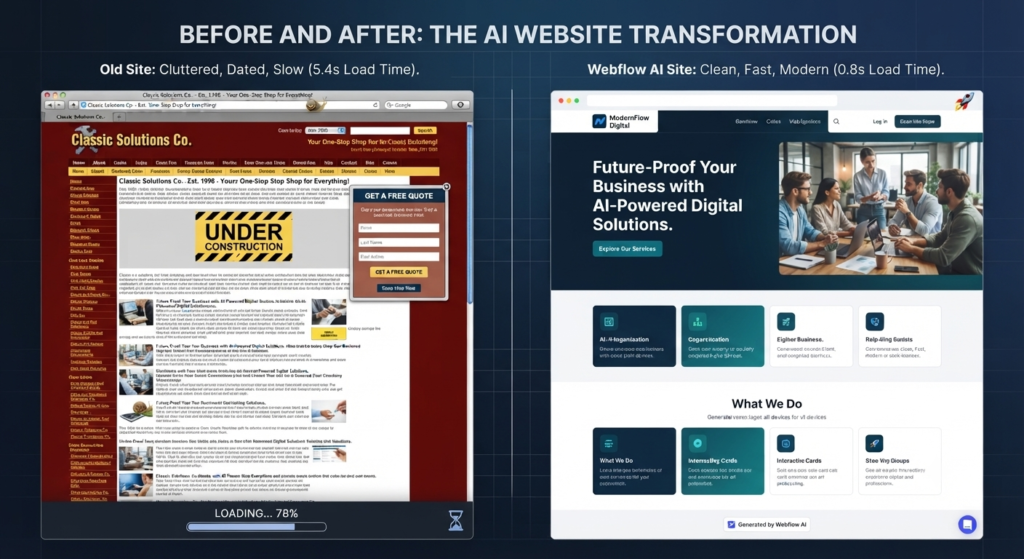
What it is: Webflow is the professional-grade builder. It gives you the design control of custom coding — without writing any code. Their AI tools generate layouts, suggest content structure, and dramatically speed up the build process. This is the tool agencies use to charge serious money.
When to use it: Use Webflow when your client is serious. A corporate company, an ecommerce brand, an NGO, a tech startup. The kind of client who will pay ₦400,000–₦800,000 for a website — or equivalent in dollars.
Why it’s one of the 7 Proven AI No-Code Tools Nigerians are cashing out in dollars with: Dollar-paying clients in the UK, US, and Canada recognise a Webflow site. It communicates quality before you say a word about your price.
How to use it — Step by Step:
- Sign up at webflow.com — free plan available
- Use AI to generate a starter layout based on your description
- Customise every element using the visual editor
- Connect domain and publish
- Set up CMS if the site needs a blog or product listings
- Connect domain and publish
Pros:
- Top-tier design quality — the kind premium clients expect
- Best tool for building a long-term agency with recurring dollar income
- Huge community, tutorials, and templates available
Cons:
- Steeper learning curve — expect 1–2 days to get comfortable
- Not the fastest option for complete beginners under time pressure
- Higher pricing on advanced plans
Tool 4 — Wix AI (ADI): The One With Everything Already Built In
What it is: Wix’s Artificial Design Intelligence (ADI) builds a complete website from a short questionnaire. It even pulls in your social media content to help fill the site. And Wix has one of the best app marketplaces of any website builder — booking tools, email lists, payment systems, all built in.
When to use it: Event planners, caterers, fashion sellers, service businesses. If your client needs appointments, payments, or email marketing baked into the site — Wix ADI is the right choice.
Why it’s one of the 7 Proven AI No-Code Tools to Build a Site in 45 Minutes: Wix integrates directly with Paystack, meaning Nigerian customers can pay on the website in Naira. For ecommerce and service businesses, this alone makes it worth choosing.
How to use it — Step by Step:
- Go to wix.com → click “Get Started”Choose “Let Wix ADI build it for me”
- Answer the short questionnaire about your business
- Pick your favourite from the 2–3 designs it offers
- Customise, add your Paystack payment link, and publish
Pros:
- Direct Paystack integration — collect Naira payments on the site
- Large app marketplace for booking, email, and ecommerce
- Very easy drag-and-drop editing after launch
Cons:
- Wix branding appears on the free plan — clients will notice
- Sites can load slightly slower than Framer or Webflow builds
Tool 5 — 10Web (WordPress AI): The Long-Term Power Move
What it is: 10Web generates a full WordPress website using AI. You describe your site, and it builds it on WordPress — the platform that powers 43% of all websites on the internet. All the WordPress power, with none of the painful manual setup.
When to use it: Blogs, news sites, large ecommerce stores, or any client who wants a website that can grow with their business for years. WordPress gives you more long-term flexibility than almost any other platform.
Why it’s one of the 7 Proven AI No-Code Tools Nigerians are cashing out in dollars with: Clients built on WordPress never get locked into one company. The site can move, scale, and add features forever. That makes clients loyal to you — because you gave them something that lasts.
How to use it — Step by Step:
- Go to 10web.io → create a free account
- Click “Generate with AI” and describe your website
- 10Web builds a complete WordPress site in about 2 minutes
- Log in to your WordPress dashboard to edit
- Connect your domain and publish
Pros:
- Built on WordPress — most powerful and flexible CMS available
- AI generates the structure fast, you just refine it
- Great for retaining long-term clients who need ongoing updates
Cons:
- Heavier on internet — not great in very low-connectivity areas
- Slightly more complex than other tools for total beginners
One more thing — these AI tools generate a lot of content automatically. But AI-written content can sometimes feel robotic to readers and underperform on Google.
Tool 6 — Mobirise AI: The Tool That Works When NEPA Takes Light
What it is: Mobirise is a desktop application. You download it to your laptop and build websites completely offline. No internet needed. Their AI features generate layouts, sections, and content all on your local machine — no Wi-Fi required.
When to use it: This is your tool for the days NEPA has taken light, your generator is running, but the router is off. Mobirise keeps going. Build the full site offline, upload it when your connection comes back.
Why it’s one of the 7 Proven AI No-Code Tools to Build a Site in 45 Minutes — especially in Nigeria: No other tool on this list works fully offline. In a country where internet is unreliable and power cuts happen daily, having a tool that doesn’t need either is not optional — it’s essential.
How to use it — Step by Step:
- Download Mobirise free from mobirise.com (Windows or Mac)Install and open — no internet needed after this
- Choose a template, use the AI block generator to build your pages
- Drag and drop sections, add client content
- When internet returns, upload to your hosting or use Mobirise’s hosting
Pros:
- Works 100% offline — power cut? No problem. No Wi-Fi? Still building
- Free to download and use for basic projects
- Exports clean HTML files you can host anywhere
Cons:
- Design quality is not as modern as Framer or Webflow
- AI feature set is more limited than cloud-based tools
- Interface looks slightly outdated compared to newer tools
Tool 7 — Durable AI: The Fastest Website on Earth (30 Seconds, No Joke)What it is: Durable builds a complete business website — text, images, contact form, all of it — in approximately 30 seconds. Not 30 minutes. 30 seconds. It’s the fastest website generator that exists right now.
When to use it: When you need something live urgently. A client calls today and needs a site tomorrow — Durable is how you deliver. Also perfect for students building their very first portfolio with zero budget.
Why it’s the final tool in these 7 Proven AI No-Code Tools to Build a Site in 45 Minutes: It’s free to start and produces results professional enough to show a real client. Speed plus quality plus zero cost — for beginners, nothing beats it.
How to use it — Step by Step:
- Go to durable.coType your business type and location (e.g., “Event planner, Abuja”)
- Click “Generate” — watch it build in 30 seconds
- Replace placeholder text with real client information
- Upgrade to a paid plan to connect a custom domain, then publish
Pros:
- Fastest website generator available — 30 seconds from zero to full site
- Free plan available — ideal for students with no startup budget
- Results look professional enough to impress a client immediately
Cons:
- Limited customisation for complex multi-page websites
- Durable branding shows on the free plan — paid plan needed for client work
- Not the right choice for premium clients expecting advanced functionality
The Exact 45-Minute Workflow (NEPA-Proof Edition)
Here is the complete step-by-step timeline. Set a timer right now and follow it.
Minute 0–5: Gather Everything First: Don’t open any tool yet. In your notes app, write down: business name, exactly what the business does, phone number, services offered, and at least one photo. Having this ready saves you from stopping mid-build to find information.
Minute 5–15: Let the AI Build: Openyour chosen tool. Type in the business description and let it generate. Don’t interrupt it. Don’t overthink the first draft. Let the AI do its job — you’ll edit after.
Minute 15–25: Replace All Placeholder Content: AI tools generate dummy text and stock photos. Go through every page and replace with the real business name, real services, real phone number, and a real photo. The homepage headline is the most important — make it clear what the business actually does.
Minute 25–35: Add the Pages That Matter: Most local businesses only need three pages: Home, Services (or About), and Contact. Add a WhatsApp chat button — this single addition increases customer enquiries by a huge amount for Nigerian businesses.
Minute 35–40: Check Mobile: Over 80% of Nigerians browse on their phones. Preview the site on mobile before you publish. Most AI tools auto-optimise for mobile, but always verify yourself.
Minute 40–45: Publish, Test, and Share: Hit publish. Open the live link on your own phone. Click every button. Test the contact form. Send the link to yourself on WhatsApp and check how it looks on mobile. If everything works — the site is live.
What if NEPA strikes during your build?Switch to Mobirise on your laptop immediately. Continue building offline. Save your work. Upload when power or internet returns. These 7 Proven AI No-Code Tools to Build a Site in 45 Minutes exist for the real Nigerian experience — and Mobirise is your backup plan for exactly this reason.
How Much to Charge and How to Get Paid in Dollars. This is the section most guides skip. Let’s talk money.
Local Nigerian Pricing:
- Single-page business site: ₦80,000 – ₦150,000
- Standard 3–5 page site: ₦150,000 – ₦300,000
- Ecommerce site with payments enabled: ₦300,000 – ₦450,000
You built the site in 45 minutes. The client doesn’t need to know that. What they’re paying for is the outcome — new customers finding them, more sales, a professional online presence. That’s what you sell.
The Pitch Script That Actually Works:
Don’t say: “I can build you a website using Wix AI.”Say this: “Right now, if anyone searches for [their business type] in [their area], they can’t find you. I can change that this week. You’ll start showing up online, customers can see what you offer, and they can reach you directly. Most of my clients start getting new enquiries within two weeks.”
That’s how Nigerians are cashing out in dollars — and Naira — using these 7 Proven AI No-Code Tools to Build a Site in 45 Minutes. Sell the result. Never sell the technology.
How to Receive Foreign Payments:
- Payoneer — best for international freelance marketplaces like Upwork and Fiverr
- Binance P2P — receive USDT, sell immediately for Naira at the current rate
- Wise — ideal for UK and European clients paying in pounds or euros
- Grey or Cleva — Nigerian fintech that gives you a real US bank account number for dollar transfers
And if dollar-paying subscriptions and tools are part of your workflow, check out our guide on ➡️ 7 Proven Ways to Pay for AI Subscriptions in Nigeria (2026 Guide)/how-to-pay-for-ai-subscriptions-in-nigeria for easy workflow.
Tool Selection Matrix: Which of the 7 Proven AI No-Code Tools Is Right for You?
| Your Profile | Best Tool to Build a Site in 45 Minutes | Why This Choice |
|---|---|---|
| Student with zero Budget | Durable AI | Free tier, 30-second build, professional enough for a first portfolio |
| Busy 9-to-5 worker | Hostinger | Hostinger included, Naira payment, 5-minute setup |
| Ecommerce or product seller | WixAI | Built-in Paystack, product pages, booking and email tools included |
| Freelancer building an agency | Webflow | Premium design that justifies premium prices with foreign clients |
| Area with bad internet or frequent power cuts | Mobirise AI | Works 100% offline-NEPA cannot stop you |
| Client needed urgently, today | Durable AI | Entire site live on 30 seconds, edit and publish same day |
| Blog, news, or growing business | 10Web (WordPress AI) | WordPress and flexibility with AI speed |
Hard Truths: The Real Pros and Cons of No-Code AI Building
These tools are powerful. But let’s be honest about the limits.
The Genuine Pros:
- Speed that changes everything — What once took a developer 3 weeks now takes you 45 minutes. That’s not an exaggeration.
- Zero coding required — No HTML, no CSS, no JavaScript. None of it.
- Affordable to start — Most tools have free tiers. Even paid plans cost far less than one developer invoice.
- Easy to update — When the client needs a price change or a new photo, you do it in minutes without calling anyone.
- AI keeps improving — Every month these tools get better, faster, and smarter.
The Real Coins:
- Platform lock-in — A site built on Wix stays on Wix. Moving it later is painful.
- Complex features have limits — You can’t build a fully custom app or complex system with these tools.
- Bloated builds load slowly — Some AI-generated sites add unnecessary elements that slow down the page speed.
- Paid plans are eventually necessary — Free tiers are great for starting, but client work needs paid plans to remove branding and connect custom domains.
The pros still win — especially for Nigerians just starting out. These 7 Proven AI No-Code Tools to Build a Site in 45 Minutes are not a compromise. They’re a shortcut to real income.
My Personal Recommendations (What I Would Use Today)
If you have a client deadline today: Start with Durable AI. Get something live in 30 minutes. Collect the deposit. Polish it afterwards.
If you’re building your own brand or portfolio: Use Framer AI. The design quality will make you look like a professional studio even if this is your first ever website.
If you want to build a serious agency with dollar clients: Learn Webflow. There’s a learning curve — give it one weekend. The earning potential on the other side justifies every minute of it.
If your internet is unreliable or NEPA is a daily issue: Install Mobirise right now. Today. Don’t wait until you need it.
Frequent Asked Questions
1. Can I take Naira payments directly through these websites?
Yes. Wix and 10Web both integrate with Paystack, allowing Nigerian customers to pay in Naira by card, bank transfer, or USDT. Set this up and you have a fully functional Nigerian ecommerce site.
2. Can I build and manage the site on my phone?
Hostinger AI and Wix ADI both have mobile apps for editing on the go. Framer and Webflow are better on a laptop. If your primary device is a phone, start with Hostinger.
3. Do I need to buy a domain name?
All tools give you a free subdomain to start. For client work, a custom domain (like www.yourbusiness.com) costs roughly ₦5,000–₦15,000 per year and is worth every kobo. It’s the difference between looking like a test site and looking like a real business.
4. What if my internet is too slow or keeps cutting out?
Download Mobirise. It’s the only one of these 7 Proven AI No-Code Tools that works completely offline. Build your entire site without any connection, then upload when your network stabilises.
5. Will my site actually show up on Google?
AI-built sites can rank on Google — but you need to add basic SEO: a clear page title, a description, and relevant keywords in your content. One important step many people miss: the AI-generated text needs to sound natural, not robotic. But don’t click on this our guide on ➡️ How to Humanize AI Content in 2026 (7 Proven Methods)
6. How do I find my first paying client?
Start with one business near you — a barber, a restaurant, a boutique. Offer to build their site for free. Screenshot the result. That’s your portfolio. The second client pays. The third client pays more. Some builders have also started sharing their process online — and it turns out.
7. Do I need any technical background at all?
None. Zero. These 7 Proven AI No-Code Tools to Build a Site in 45 Minutes were specifically created for people with no technical background. If you can type a sentence and tap a button, you can build a website today. And if you’re a student who wants the complete picture on how to start earning online before graduation.
Conclusion: Your 7-Day Challenge Starts Right Now
Let’s bring it home.
You now have the complete breakdown of the 7 Proven AI No-Code Tools to Build a Site in 45 Minutes — Framer AI, Hostinger AI, Webflow, Wix AI, 10Web, Mobirise, and Durable. You know which one fits your situation, how to charge for your work, how to pitch a local business owner without sounding like a tech person, and how to receive dollars when the foreign clients start coming.
The tools are free. This knowledge is in your hands right now.
Here is your 7-Day Challenge:
- Day 1 — Pick ONE tool from this list. Create a free account.
- Day 2 — Build a practice site for a fictional business or your own personal brand.
- Day 3 — Identify one real local business near you that has no website.
- Day 4 — Build them a free sample site. Don’t ask permission. Just build it and show them.
- Day 5 — Show it to the business owner on your phone, in person.
- Day 6 — If they like it, name your price. If not, move to the next one.
- Day 7 — Collect your first payment or publish your own live portfolio.
The Nigerians who are cashing out in dollars using these 7 Proven AI No-Code Tools to Build a Site in 45 Minutes are not more talented than you. They are not better connected. They are not luckier.They just started before you.Your 45 minutes begins now.
If this guide helped you, share it with someone who still thinks building a website costs ₦1 million and takes three months. Not anymore.